Phishing Campaigns: Simulating Real Adversary Tactics

Nowadays, one of the most dangerous and effective attack vectors is the phishing campaigns. From an offensive perspective, there are several differences between a whaling campaign and a massive phishing campaign. However, there are also several common points that should be accomplished in both cases.

At security professional, one of the goals is to help improve security in the industry. To achieve this target, annual phishing campaigns works well to enhance the detection and reporting rates of entities and companies.

The post will cover several phases of these engagements and provide some details on how we work to achieve our goals.

Infrastructure

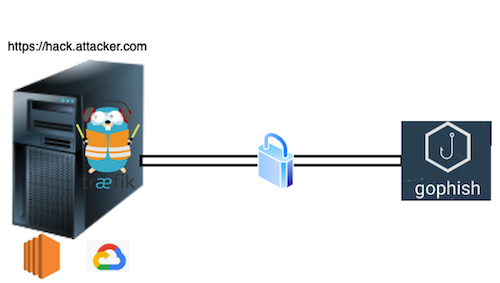
Starting with a Red Team Infrastructure model, team server and redirectors are used. Redirectors play a crucial role in Red Team engagements, as they are used to conceal the actual IP addresses and route traffic through intermediate points before reaching the target network. This obfuscation enhances the red team’s stealth during attacks, making it more challenging for defenders to detect and respond to their activities. Redirectors are essential for maintaining the security of client information on the team server, which is allocated in the company’s internal network.

The team server serves as a centralized command center that communicates with compromised systems or “agents” deployed on target networks. In the context of a phishing campaign, the team server is employed to run the applications and tools necessary for conducting the engagement.

To achieve this, we will be utilizing Traefik as a redirector. Traefik will handle SSL certificates and help route traffic securely. Additionally, GoPhish will be used to send emails and manage the campaign effectively. To establish seamless and secure connections between the elements, we will use Headscale, which is a self-hosted alternative compatible with Tailscale. This combination of tools ensures that data is protected, and the engagement is conducted with utmost safety and confidentiality in mind.

Redirector

As a redirector, a Linux host in the cloud was utilized. There are various trusted platforms available for this purpose, and the choice depends on individual preferences and requirements.

To run Traefik, Docker needs to be installed as it serves as the containerization platform for Traefik. According to the website, Traefik is an open-source Edge Router that simplifies the process of publishing your services. It acts as a request receiver on behalf of your system and determines which components are responsible for handling those requests. Developed in Golang, Traefik is known for being lightweight and faster than other commonly used options like Apache and Nginx.

Although, we will not go over the configuration files, in this case, traefik used two different files traefik.toml, where the server configuration, such as ports or logs paths, is stored. The second file is traefik_dynamic.toml, which is referenced in traefik.toml. This file is responsible for handling the SSL configuration and the behavior of the redirector.

By leveraging Docker and these configuration files, Traefik provides a user-friendly experience for managing and routing your services efficiently.

Additionally, Traefik has built-in capabilities to handle SSL certification. However, for our setup, we will generate SSL certificates using cerboot. The main goal of this post is to learn how to deploy a full phishing infrastructure. To reduce the detection rate, it should not use cerbotot. A self-signed SSL certificate in combination with Cloudflare is a better option.

To ensure all the software needed is installed in the host, the script ‘redirector.sh’ will install cerboot, docker, tailscale and other software required to set up our redirector correctly.

To ensure that all the necessary software is installed on the host, we have created a convenient script called redirector.sh. This script will install cerboot, Docker, Tailscale, and any other required software to set up our redirector correctly.

The SSL certificates generated with cerboot will be stored in the cert/ folder, while all the log files will be found in log/. Additionally, the system/ folder will store files required by Traefik in case you want to run Traefik as a service on the host.

dan1t0@cybertron:~/dinam1t0$ ls -1
cert/
log/
redirector.sh
systemd
traefik.sh
traefik.toml
traefik_dynamic.toml

traefik.sh allows to build the configuration of the redirector in case it was not run previously.

dan1t0@cybertron:~/dinam1t0$ sudo ./traefik.sh build hack.attacker.com
- Genereting SSL certs with certboot...
  -> Checking IPs
  -> Local IP: X.X.X.X (hidden)
  -> hack.attacker.com point to X.X.X.X (hidden)
cerbot command -> certbot certonly --standalone -d hack2.attacker.com --staple-ocsp --agree-tos --register-unsafely-without-email

- SSL certificates generated correctly
- Certificates found
- Running docker containers
  -> Cleaning previous version
     docker rm -f traefik
  -> Deploying docker
docker run -d -v /var/run/docker.sock:/var/run/docker.sock -v /home/dan1t0/dinam1t0/log:/log -v /home/dan1t0/dinam1t0/cert:/cert -v /home/dan1t0/dinam1t0/traefik.toml:/traefik.toml -v /home/dan1t0/dinam1t0/traefik_dynamic.toml:/traefik_dynamic.toml -p 80:80 -p 443:443 --name traefik --hostname traefik traefik:v2.10
traefik
fbc5ed8f95e4ac284ce0a8f4e9749946d7b22531646993f50b86a280fabdbff5

dan1t0@cybertron:~/dinam1t0$ sudo docker ps
CONTAINER ID   IMAGE           COMMAND                  CREATED         STATUS         PORTS                                                                      NAMES
fbc5ed8f95e4   traefik:v2.10   "/entrypoint.sh trae…"   9 seconds ago   Up 6 seconds   0.0.0.0:80->80/tcp, :::80->80/tcp, 0.0.0.0:443->443/tcp, :::443->443/tcp   traefik

While the script can be executed with just one domain name, it also accepts multiple domain names as input.

Although, this blogpost is not a tutorial about how traefik works, we will focus on discussing two of the most crucial aspects of the configuration in traefik_dynamic.toml:

[http.routers.gophish]
  rule = "Host(`hack.attacker.com`) && Query(`ogt=`) && !HeadersRegexp(`User-Agent`, `(?i:wget|curl|HTTrack|crawl|google|bot|b-o-t|spider|baidu)`)"
  entrypoints = ["websecure"] # ["web"]
  service = "gophish"
  priority = 30
  [http.routers.gophish.tls]

[http.services.gophish]
  [http.services.gophish.loadBalancer]
    [[http.services.gophish.loadBalancer.servers]]
      url = "http://gophish:8080/"

[http.routers.gophish] is the section in the configuration where the redirector rules are defined. Within this section, various options supported by Traefik can be utilized, such as filtering requests based on user-agent or adding special strings to the URL, in this example the string ogt is used. The explanation about the string value will be explained below.

Filtering traffic by the User-Agent header in a phishing campaign is an important defensive measure to detect and potentially block or limit the Blue Team activities. The User-Agent header is a part of the HTTP request sent by web browsers, applications, or automated scripts when they communicate with a web server. It contains information about the client’s identity, such as the type of browser or application and its version. In addition to Blue Teams, it is recommended to add user-agent of bots to avoid be flagged easily.

[http.services.gophish] sets the internal path where the request that meet our requirements are sent. In our case, it will be sent to http://gophish:8080/ where our Gophish instance is running internally. The hostname is configured during the Tailscale configuration process.

GoPhish

GoPhish is a well-known tool for conducting phishing campaigns. However, it is recommended to add some modifications in the original source to remove IOCs.

These IOCs are potential signs of a security breach or malicious activity that could be used by defenders or security tools to detect and respond to phishing attempts.

By removing IOCs from the source code, the phishing campaigns become more challenging for defenders to detect, allowing the red team to maintain a higher level of stealth and effectiveness during engagements.

A good starting point to remove the GoPhish IOCs is Sneaky GoPhish where the following lines are modified:

# Stripping X-Gophish 
sed -i 's/X-Gophish-Contact/X-Contact/g' models/email_request_test.go
sed -i 's/X-Gophish-Contact/X-Contact/g' models/maillog.go
sed -i 's/X-Gophish-Contact/X-Contact/g' models/maillog_test.go
sed -i 's/X-Gophish-Contact/X-Contact/g' models/email_request.go

# Stripping X-Gophish-Signature
sed -i 's/X-Gophish-Signature/X-Signature/g' webhook/webhook.go

# Changing servername
sed -i 's/const ServerName = "gophish"/const ServerName = "IGNORE"/' config/config.go

# Changing rid value
sed -i 's/const RecipientParameter = "rid"/const RecipientParameter = "ogt"/g' models/campaign.go

The parameter rid is added to the URL of the link sent to the targeted user. In the previous example, it was changed to the highlighted string ogt.

This string is added in the configuration of the redirector in the traefik configuration files. As a result, the URL of the cloned portal location and the pixel tracking sent to the target will be modified by this http://hack.attacker.com/?ogt={randomToken}.

Once the changes are made, gophish source code is ready to be built by executing go build.

To boost our phishing infrastructure, we can monitor Gophish using additional scripts running in our internal server. These scripts will enable us to receive real-time alerts every time a user submits their credentials. We can achieve this by leveraging tools like Pushover, which will provide instant notifications.

Another effective strategy is to use Sendinblue or Mailgun over SMTP or explore other alternatives to get instant karma in our emails and save time that we can use to improve our ruses.

In the future, we will share some Gophish tricks to further enhance the efficiency and effectiveness of our campaigns.

Reviving My Early Days and Looking Ahead -> [THE BEGINNINGS]

Recently, I have decided to revive my old blog by re-publishing my early cybersecurity posts as a tribute to where it all began. These posts, all in Spanish and flagged with ”[THE BEGINNINGS]” in their titles, were originally hosted on https://dan1t0.wordpress.com (El Rincón de dan1t0) back in 2010. At that time, I simply shared small tips and personal experiences that helped me take my first steps in IT security.

Reading these entries now, I am amazed at how far I’ve come. They remind me of my humble beginnings as a security auditor and ethical hacker. For sentimental reasons—and to preserve this important legacy—I am keeping these posts alive.

Below are the articles I’m referring to:

  • [THE BEGINNINGS] Tipos de ataques Denial-of-Service
  • [THE BEGINNINGS] Wireshark: Instalación en Mac OS y manual de uso
  • [THE BEGINNINGS] Análisis de redes: Enumeración de sistemas Windows
  • [THE BEGINNINGS] Qué es y cómo funciona un escaneo de puertos Idle
  • [THE BEGINNINGS] Seguridad: comprometiendo un switch (Parte 1 de 2)
  • [THE BEGINNINGS] Manifiesto por una Red Neutral
  • [THE BEGINNINGS] Seguridad: comprometiendo un switch (Parte 2 de 2)
  • [THE BEGINNINGS] GNS3: Instalación y configuración básica
  • [THE BEGINNINGS] Tips: Jailbreak iPad 4.2.1 Untethered Greenpois0n
  • [THE BEGINNINGS] Scapy: Construyendo un paquete UDP
  • [THE BEGINNINGS] ZAP y proxys Web: Analizar el trafico durante la navegación
  • [THE BEGINNINGS] RFI/LFI: ¿y ahora qué?
  • [THE BEGINNINGS] Configuración fácil y rápida de OpenVPN en MacOS X
  • [THE BEGINNINGS] DoS sobre renegociación SSL/TLS (CVE-2011-1473)
  • [THE BEGINNINGS] pySIM-Reader: Accediendo a una tarjeta SIM
  • [THE BEGINNINGS] Tools y Contribuciones

In this post, I explain my journey of reviving my blog by bringing these early entries back into the spotlight as a reminder of my progress over the years. Moving forward, the content here will focus on current cybersecurity topics, but I felt it was important to preserve these legacy posts for both sentimental and historical reasons.

Happy Hacking!

[THE BEGINNINGS] Tools y Contribuciones

En esta sección iré publicando una serie de enlaces a herramientas creadas por mi y contribuciones en diferentes blogs, espero que os sea de utilidad y vaya creciendo poco a poco. Todo esta licenciado bajo GPLv3

Herramientas:

  • BascicAuthBF: Easy tool to bruteforce HTTP Basic access authentication like tomcat, CISCO, etc GitHub Updated: 2025: The project was recently moved from BitBucket

Posts:

[THE BEGINNINGS] pySIM-Reader: Accediendo a una tarjeta SIM

La herramienta de la que vamos a hablar hoy, hace unos años tenía más sentido que ahora, ya que con los nuevos móviles y smartphones la tarjeta SIM ha quedado relegada a un segundo plano, en la actualidad prácticamente solo sirve de interacción con el operador. Ya podréis haceros a la idea de que hablamos de una herramienta que sirve para explorar la tarjeta SIM de un móvil en busca de datos. Para ello utilizaremos el software escrito en Python llamado pySIM.

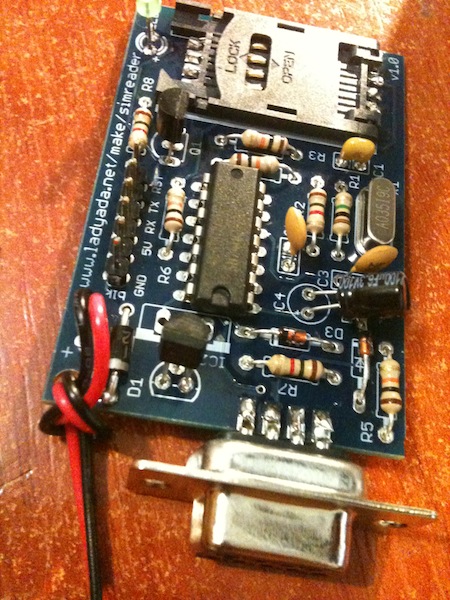
Para ello necesitamos primero el hardware, en este caso hay dos posibilidades, una de ellas es la que comenta la web y otra encontrada por mí de pura suerte. El software del que hablamos se conecta a la tarjeta a través de un dispositivo por un puerto serial, pues bien, en la ya conocida web de DealExtreme encontramos un lector de tarjetas SIM por menos de 3€ que para funcionar necesita un driver USB-2-Serial windows Mac OS X y que funciona correctamente con pySIM-Reader. Y la otra opción más divertida y la que en un principio hice yo es comprarlo y montarlo yo mismo, es más caro, pero la satisfacción de hacerlo y que funcione para algunos es más gratificante.

Por otro lado para hacerlo funcionar depende del sistema operativo, en Windows podemos descargar el ejecutable de aquí, para Linux y Mac OS X necesitamos tener instalado Python, pySerial (librería para interactuar con un puerto serial [COM] y wxPhyton (librerías de Python para generar entornos gráfico), además del código del programa. Para que funcione correctamente en Mac OS X os recomiendo MacPort con Python 2.6 y instalar wxPhyton y pySerial desde MacPort también, a mi de otra forma me dio muchos problemas.

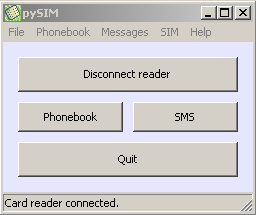
Interfaz pySIM

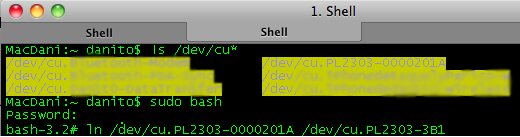
Para hacerlo funcionar puedes conectarlo a través de un conversor USB-Serial y al abrir el pySIM-Reader te pedirá que le digas el dispositivo, en Mac OS X y Linux os puede pasar que el dispositivo creado no sea el que aparece en la ventana del programa, mi solución fué hacer un ln entre el dispositivo real creado en /dev/ y el que te reconoce el programa, si os contáis directamente por cable serie puede que no tengáis este problema.

Creando el link al dispositivo requerido:

El programa tiene un pero muy grande y de cierto modo es lógico, y es que para extraer los datos de la SIM hay que facilitar el código SIM, por lo que solo podemos extraer información de nuestra SIM o en el caso de que tenga deshabitado el PIN, pero evidentemente al ser el software OpenSource podemos acceder al código y entender a un bajo nivel como accede al chip.

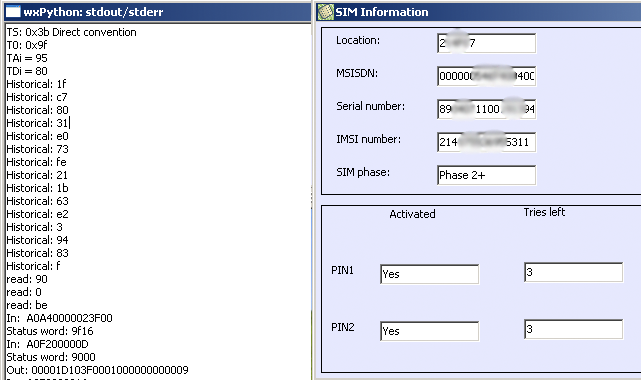
Informacion incial del programa (izquierda) y de la SIM (derecha):

El software permite entre otras cosas:

  • Agenda:
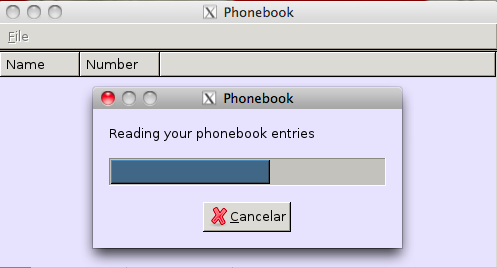
    • Mostrar Agenda
    • Modificar Agenda
    • Mostrar última llamada
    • Hacer/Restaurar backup de Agenda
  • SMS:
    • Mostrar SMS
    • Hacer/Restaurar backup de SMS
  • SIM:
    • Mostrar información de la SIM (no necesita PIN)
    • Cambiar el PIN
    • Habilitar/Deshabilitar el PIN

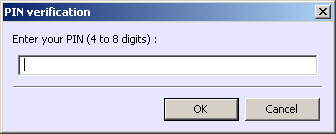
Petición de código PIN:

El programa accede a la SIM de una forma más o menos sencilla de entender, la SIM funciona como una memoria de tamaño fijo (64K por ejemplo) la cual está dividida en sectores o partes y cada parte tiene habilitada varios espacios de memoria fijos en los que se almacena la información. De esta forma el programa, de acuerdo con la RFC de la arquitectura de una tarjeta SIM, sabe que si accede a la posición X,N accede por ejemplo a un registro que guarda un número de teléfono y si accede a X,N+1 accedería a el número de teléfono siguiente almacenado. Podemos decir que está estructurada en una especie de matriz.

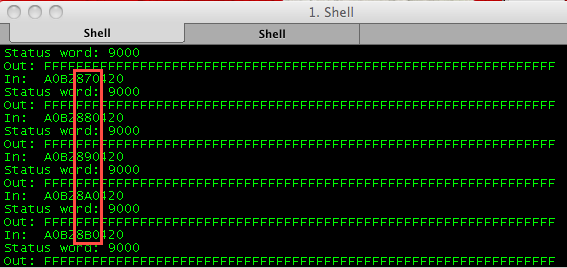
pySIM recorriendo la estructura interna de la SIM:

Para poder acceder a esta matriz hay que conocer el PIN, ya que entre los datos y la petición del teléfono o el lector existe un microprocesador que es el que se encarga de comunicar ambos lados. Este programa con sus limitaciones puede ser interesante si por ejemplo lo usamos para hacer un forense a un móvil de empresa que conocemos el código PIN.

Os enseño una foto del resultado una vez soldado:

[THE BEGINNINGS] DoS sobre renegociación SSL/TLS (CVE-2011-1473)

Siempre que hablamos de conexión segura en internet solemos hablar de HTTPS, la diferencia básica entre HTTP y HTTPS es que mediante el protocolo HTTP la información viaja en plano por lo que cualquier intermediario puede husmear nuestra información cosa que no nos interesa, a raíz de la necesidad de mayor seguridad nació HTTPS que añade una capa de cifrado en la comunicación de nuestros datos en la capa de transporte, este cifrado se realiza a través del estándar SSL/TLS. Netscape desarrolló en 1996 SSLv3 que más tarde sirvió para asentar las bases del desarrollo del estándar TLSv1.0, la versión actual es TLSv1.1. En el post de hoy intentaremos explicar como realizar un ataque de denegación de servicio aprovechando que un sitio acepte la renegociación SSL/TLS.

Normalmente cuando alguien desarrolla una web en la que se necesita un nivel de seguridad, ya sea por un login, o por que se realizan tareas delicadas como operaciones bancarias, intranet de una empresa o compras online; es necesario implementar HTTPS, como ya hemos comentado hay diferentes versiones de SSL/TLS y muchas veces las versiones antiguas de los navegadores no son compatibles con las versiones más nuevas de los protocolos de cifrado que HTTPS puede implementar, estas versiones antiguas tienen problemas como niveles de cifrado débiles para la actualidad, menores de 128bits o como en el caso que nos ocupa, tener activada la renegociación de la conexión puede hacer que seamos víctimas de un ataque DoS. En muchas ocasiones esto es permitido por las webs para que sus clientes no tengan problemas de acceso, y puedan navegar aunque estén usan un protocolo de cifrado de hace 10 años. O simplemente por un despiste del desarrollador del sitio.

Para poder explicar como funciona este ataque D.o.S. es importante primero entender como funciona el handshake de HTTPS:

En la primera parte se establece la versión del protocolo sobre la que se trabajará; se establece un id de sesión; el servidor envía su cipher suite que es una lista de protocolos, versiones y métodos de cifrados que acepta; se decide el método de compresión y se intercambian una serie de valores aleatorios.

  • Este paso es opcional, el servidor envía su certificado y la verificación del mismo.

  • Este paso va de la mano del paso 2, el cliente responde al servidor con su certificado y la verificación del mismo.

  • En este paso se produce el intercambio final de los certificados del cliente y servidor y de sus espeficaciónes correspondientes. A partir de ahora la comunicación cliente-servidor es cifrada.

La base de este ataque se encuentra en el consumo de recursos que le supone al servidor en relación con el cliente, para que nos hagamos una idea un servidor puede negociar entre 150-300 handshakes por segundo (según la potencia del mismo), mientras que un cliente puede solicitar hasta 1000 handshakes por segundo, por lo que no es necesario una botnet ni un súper ordenador para realizar este ataque. Pero para que este ataque surta el efecto deseado el servidor tiene que tener habilitada la renegociación de SSL/TLS. Como podemos observar, es fácil darse cuenta de por donde van los tiros en este ataque, pedir N peticiones de renegociación de cifrado a nuestro servidor víctima.

Hay varia formas de detectar esta vulnerabilidad, si usamos Nessus existe un plugin (ID53491), aunque también se puede comprobar de forma manual con el comando openssl:

openssl s_client -connect IP:PUERTO
HEAD / HTTP/1.0
R
RENEGOTIATING

Si nos devuelve RENEGOTIATING podemos tener claro que el servidor es vulnerable:

Los chicos de www.thc.org The Hackers Choice< han desarrollado una herramienta para poder explotar esta vulnerabilidad a fondo, la podeis encontrar aqui.

Para prevenir este tipo de ataques y otros como MiTM es muy importante tener siempre desactivadas las versiones mas desfasadas de los protocolos de cifrado, tener el software siempre actualizado, las últimas versiones de Apache no son vulnerables y tiene la renegociación SSL desactivada, al igual que las últimas versiones de Microsoft IIS. Por otro lado también es interesante implementar reglas de forma que una determinada IP tenga un número máximo de renegociaciones SSL por segundo, por ejemplo 5, ya que muchas veces como en el caso de querer que los clientes tengan que autenticarse en ciertas paginas con certificados X509 es necesaria tener activada la renegociación.

Es importante comentar que el fallo no está en el protocolo en si, sino en la opción de renegociación de la conexión cifrada.


Fuentes:

Page 2 of 5